
You install Steam Workshop mods on a DZSERVERS.HOST server from the Workshop Mods tab: paste the mod’s Workshop URL or numeric id, click Lookup & add, accept its required dependencies, then restart. The panel builds the -mod= and -servermod= launch arguments from that list on every start, in the order the rows appear — so the order in that table is what decides whether a modded server boots.
This guide covers the tab end to end: dependencies, load order, server-only mods, auto-update, Verify Files and safe removal. New here? Start with getting started with the control panel.
Before you start
- An instance you can manage mods on. The tab is permission-gated; without it the page tells you to ask the owner for the Manage Mods permission.
- The Workshop page or numeric id of each mod. Browse Workshop on the tab opens the DayZ Workshop in a new tab.
- A current backup if players are already on the server — mod changes can invalidate stored objects. See automatic backups and restore.
- Ideally a stopped server. You can add mods while it runs, but the install waits for the next restart and reinstall, update, verify and remove are all disabled.
1. Look the mod up on the Workshop Mods tab
Go to Instances → your instance → Workshop Mods. The Add a mod card takes either identifier: the numeric id on its own, such as 1559212036, or the full address, https://steamcommunity.com/sharedfiles/filedetails/?id=1559212036.
Paste one into the Steam Workshop URL or numeric ID box and click Lookup & add. The panel fetches the item’s title, size, last-updated date and declared dependencies from Steam and opens the Add Workshop Mod panel. Nothing has been added yet — this is a preview.
Note: Every mod name in the table below links back to its own Workshop page, so you never have to hunt for an id twice.

2. Choose how the mod loads
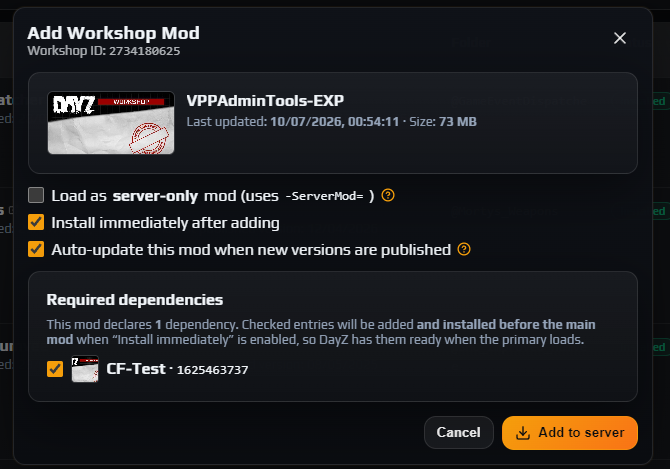
The Add Workshop Mod panel shows the thumbnail, title, Last updated date and Size, and flags two things worth stopping for: a banned Workshop item, and a mod already in this server’s list. Then three decisions:
- Load as server-only mod (uses -ServerMod=) — passes the mod in
-servermod=instead of-mod=, so players do not need it to join. Leave it off unless the mod’s description says it runs server-side only. - Install immediately after adding — on by default. While the server is running the same checkbox reads Download now, install on next restart: the download starts against the node’s Workshop cache at once, and the mod is copied into your instance automatically at the next start.
- Auto-update this mod when new versions are published — the panel watches Steam and applies new versions unattended. If the server is up it broadcasts a short warning, stops, updates and starts again, recording each step in the Audit Log.
Then click Add to server.
Careful: Server-only is a property of the mod, not a preference. Ticking it on a mod that ships client content produces a server nobody can join correctly — if the Workshop page does not say server-side only, leave the box clear.
3. Accept the required dependencies
If the mod declares required items, a Required dependencies card lists each with a pre-ticked checkbox. Anything already in your list is greyed out and marked (already added).
Leave them ticked. Checked dependencies are added and installed before the main mod — the panel puts their rows ahead of the parent in load order and queues their downloads first, so the files DayZ needs exist before the mod that reads them is parsed. Getting this wrong is the most common reason a modded DayZ server will not boot, and it is handled for you.
If the mod declares nothing, the panel says so. That is not a guarantee: plenty of authors document dependencies in prose and never declare them, so read the Workshop description before assuming a mod stands alone.
Careful: Skipping a dependency you do not already have does not fail silently. It reappears on the tab as a Missing dependencies card naming the id and how many of your mods need it, with an Add it button. Clear that card before starting the server.
4. Read the mod table while it installs
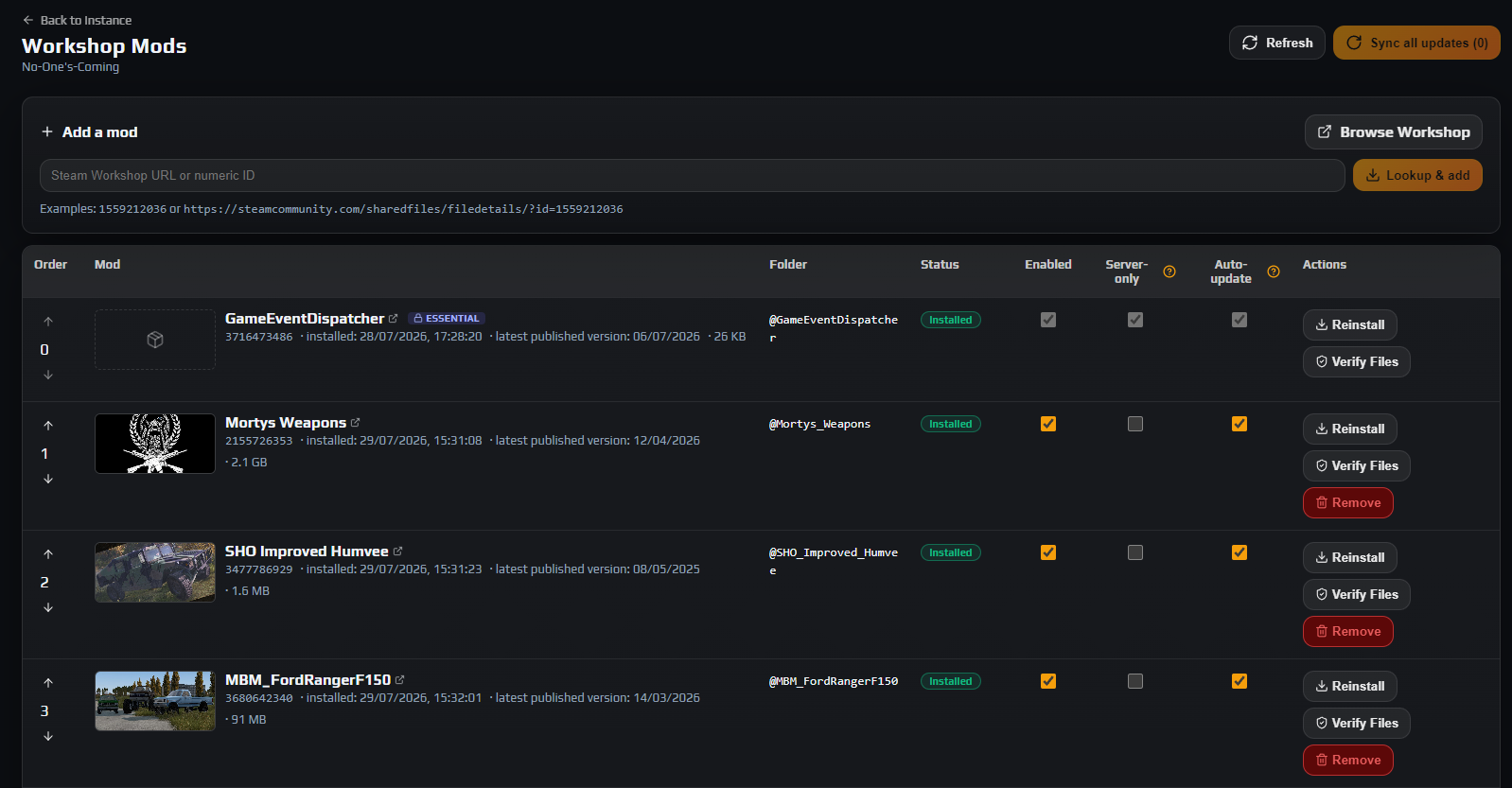
Rows with queued work grow a progress strip and refresh themselves when the command finishes; Refresh in the header is there if you want it sooner. The table has eight columns:
| Column | What it means |
|---|---|
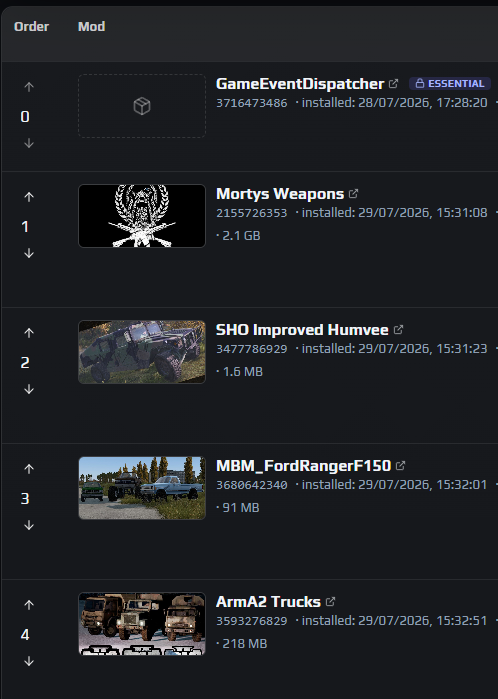
| Order | Load order, lowest first, with up and down arrows. This is the sequence used to build -mod= and -servermod=. |
| Mod | Thumbnail, title and Workshop id, all linking to Steam, plus install date, published version, size and dependency count. Errors print here in red. |
| Folder | The @ModName folder it installed into, derived from the mod’s own meta.cpp. A dash means nothing is on disk yet. |
| Status | The lifecycle pill — see below. |
| Enabled | Whether the mod is in the launch arguments at all. Untick to park it without deleting it. |
| Server-only | Whether it goes into -servermod= rather than -mod=. |
| Auto-update | Whether the panel updates it unattended. |
| Actions | Install / Reinstall / Update, Verify Files and Remove. |
NotInstalled— in your list, nothing on disk.QueuedthenInstalling— the agent is working on it.Installed— on disk and current.Update available— the author published a newer version.Installs on restart— added while the server ran; downloaded and waiting for the next start.Removing— a removal is in flight.Failed— the last install did not complete, with the reason under the mod name.
Note: A mod with an empty Folder column is left out of the launch line even when Enabled is ticked — the panel will not name a folder that does not exist. Signature keys need no attention: each mod’s .bikey files are copied into the server’s key directory for you.
5. Set the load order, then save your row changes
DayZ reads its mod list left to right and resolves each mod against what is already loaded. Anything a later mod builds on — a framework, a shared library, a base mod whose classes get extended — must appear earlier. The same rule settles conflicts: when two mods define the same thing, the one loaded later wins.
So: frameworks and dependencies first, content mods next, override or tweak mods last. Use the arrows in the Order column to move a row. Reordering is written immediately, with no save step, and takes effect at the next start. Your list becomes launch arguments shaped like this:
"-mod=@Dependency;@BigContentMod;@TweaksThatOverrideIt" "-servermod=@AdminToolsServerSide"
The three checkbox columns behave differently. Enabled, Server-only and Auto-update are drafts: clicking one outlines the box and adds the row to a banner counting your unsaved rows. Nothing reaches the server until you click Save on that row. Reset discards one row, Discard all discards every pending change. Saved toggles apply at the next launch and can be saved even while the server is running.
Note: Rows badged Essential with a padlock come from your service template. They cannot be reordered, toggled or removed — your server needs them. GameEventDispatcher, which feeds the Live Map and server FPS, is one of them.
6. Restart, then publish your mod list
Nothing on this tab is live until the server relaunches, because the list only becomes command-line arguments at start. Use Start on Overview, or Controlled Restart if players are on, and watch the Live Logs card on the rpt stream. A first boot with new mods is slower than usual.
Then deal with the client side, because this is where the complaints come from: every mod not marked server-only must be installed on each player’s PC too, or they cannot join.
- Build a Steam Workshop collection with exactly your client-side mods and pin it in your Discord and server description.
- Share the List on DZSA Launcher link from Overview — launcher users are least likely to get this wrong.
- Announce every client-side mod you add or remove. Players joining with a stale mod set get bounced and will blame the server.
Mod settings live in the mod’s own config files, usually under profiles — the Settings editor still governs vanilla options only. See every serverDZ.cfg setting explained.
7. Keep mods up to date
The panel polls Steam for new versions. When it finds one, the pill turns to Update available, the Mod cell shows the newer publish date in amber, and the row’s button changes from Reinstall to Update.
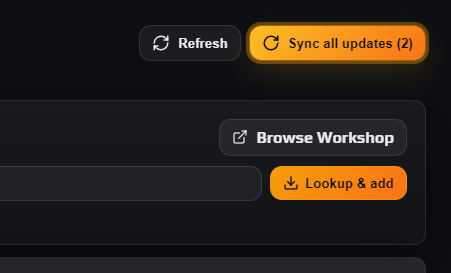
- Sync all updates in the header queues every out-of-date enabled mod at once; the number in brackets is how many it will touch.
- Update on a row does that one only.
- Auto-update on a row means you do nothing: the panel warns players, stops, updates and starts the server itself, and logs each step in the Audit Log.
- Verify Files is the repair tool — it discards the cached copy, re-downloads from Steam and prunes files the item no longer ships, so disk matches the Workshop exactly. Use it when a mod is installed but misbehaving.
Careful: All four rewrite files inside the server’s directory, so they are disabled while it is running and a banner on the tab says so. Stop the server first. If a mod update coincides with a DayZ update, do the game update first, then the mods.
8. Remove a mod safely
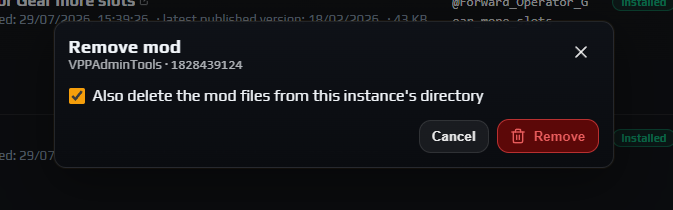
Stop the server, then click Remove on the row. The Remove mod dialog offers Also delete the mod files from this instance's directory, ticked by default; clearing it drops the row but leaves the files. If other mods declare this one as a dependency, the dialog becomes Other mods depend on this one, names them, and makes you choose Remove anyway deliberately.
Data loss risk: Removing a mod that placed objects in the world cannot be undone from the panel. Bases, storage and vehicles belonging to that mod are gone from persistence the moment the server starts without it, and inventories holding its items can be damaged. Back up first and restore Players DB and World Data together if it goes wrong — see automatic backups and restore.
The reverse holds too: adding a large content or map mod to a server that already has bases can change which stored objects are valid. Schedule that kind of change for a quiet hour with a fresh backup.
Troubleshooting
My server will not start after I added a mod
Why it happens. Usually one of three things: the mod is still NotInstalled or Failed so its files are not on disk, a dependency was never added, or the load order puts a mod ahead of something it needs.
How to fix it. Check Status and Folder first — a dash in Folder means that mod was excluded from the launch line. Clear any Missing dependencies card, then read the tail of Live Logs on the rpt stream: the first missing class or file named there tells you which mod loaded too early.
Players cannot join my modded server
Why it happens. Their client is not running the same client-side mods as the server, or a mod that needs to run on both was flagged Server-only so clients are never told about it.
How to fix it. Publish your client-side list as a Workshop collection and share the List on DZSA Launcher link from Overview. Then review the Server-only column, untick anything whose Workshop page does not explicitly say server-side only, click Save on that row and restart.
Reinstall, Update, Verify Files and Remove are greyed out
Why it happens. The server is running and holds its mod files open, so they cannot be rewritten underneath it. A banner at the top of the tab explains this.
How to fix it. Stop the instance from Overview, or use Controlled Restart to warn players first. Adding a new mod still works while it runs, and the three toggle columns can still be drafted and saved.
A mod is stuck on "Installs on restart"
Why it happens. It was added while the server was up. The download finished into the node’s Workshop cache, but copying into a live instance is not safe, so the install waits for a stop or restart.
How to fix it. Restart the server — pending mods are installed immediately before it launches and the pill flips to Installed. If it is still pending after a full restart, run Install on the row with the server stopped and read the progress strip.
The panel warns that Extra args already contains -mod= or -servermod=
Why it happens. Launch arguments were set manually on your instance and duplicate what the Workshop manager already builds from this table, so DayZ is told to load the same mods twice and your load order stops being authoritative.
How to fix it. Open a support ticket asking for the manual -mod= and -servermod= entries to be stripped from the instance’s extra launch arguments, and manage the whole list from Workshop Mods instead.
Frequently asked questions
Do my players need to install the same mods?
Yes, for every mod not flagged Server-only — those are the ones DayZ passes in -mod=, and a client without them cannot join. Server-only mods travel in -servermod= and are never downloaded by players, which is why admin tools and server-side economy mods belong in that column.
Do I have to add a mod’s dependencies myself?
No. The Add Workshop Mod panel lists every dependency the mod declares, pre-ticked, and adds them ahead of the parent in load order so they install and load first. Anything you skip, or that an author never declared, appears afterwards as a Missing dependencies card with an Add it button.
Why does load order matter for DayZ mods?
DayZ processes -mod= left to right, so a mod can only build on classes already loaded, and when two mods define the same thing the later one wins. That makes the Order column functional rather than cosmetic: frameworks and dependencies at the top, content mods next, override mods last.
Where do the mod files actually live?
Each mod installs into its own @ModName folder inside the mods share, reachable from File Browser or over SFTP. Treat it as read-only: the installer mirrors the Workshop item and prunes files it no longer ships, so hand edits are removed on the next install, update or Verify Files.
Will adding or removing a mod wipe my players or their bases?
It does not wipe anything by itself, but it can destroy specific objects. Structures, containers and vehicles from a removed mod disappear from persistence the first time the server starts without it, and inventories holding its items can be damaged. Always back up before a mod change on a populated server.
Does auto-update restart my server on its own?
Yes, when the mod is flagged Auto-update and a newer Workshop version appears. If the server is running the panel broadcasts a short warning, stops it, installs the update and starts it again, logging every step in the Audit Log. Leave it off for mods you would rather test first.