
Your DayZ server is created automatically the moment your order completes, so there is no server to build and no wizard to run — it is already waiting for you in the panel under Instances. The five things worth doing on day one are: name it, set an admin and RCON password, add any mods you want, start it, and schedule a nightly restart.
This guide walks through that first run in order and points at the deeper guides for each area. Budget about fifteen minutes.
Before you start
- A completed order. Provisioning happens on its own straight afterwards, so if you have just paid, give it a minute and refresh.
- Your panel sign-in. Use your community account through Login via Frontend, or the local username and password you were sent.
- DayZ installed on your own PC if you want to connect and test — you will need it for the final step.
1. Sign in and open your server
Go to the control panel and sign in. If your account came from the community site, use Login via Frontend — that hands you straight over without a second password. Otherwise sign in with the local username and password you were issued.
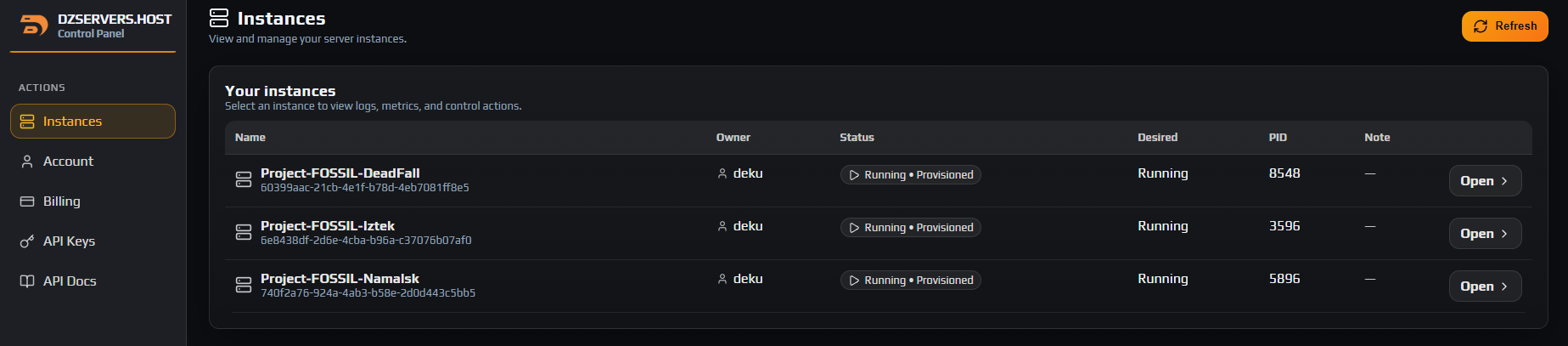
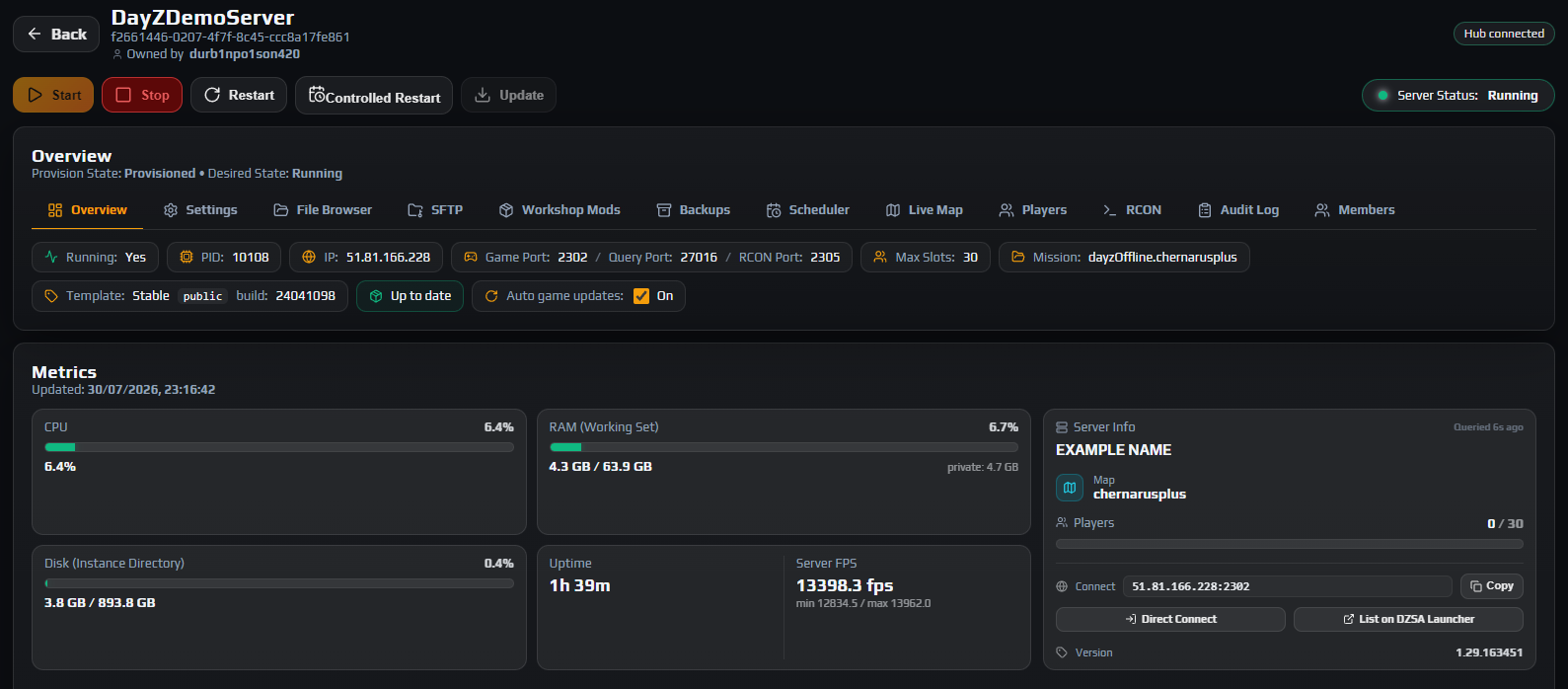
You land on Instances. Click your server to open its Overview tab, which is the hub for everything else: the power controls, the live status, the connection details and the tab bar for every other feature.
Note: The panel calls your server an instance. You will see that word throughout the interface; it means one DayZ server that you own.
2. Read the Overview tab
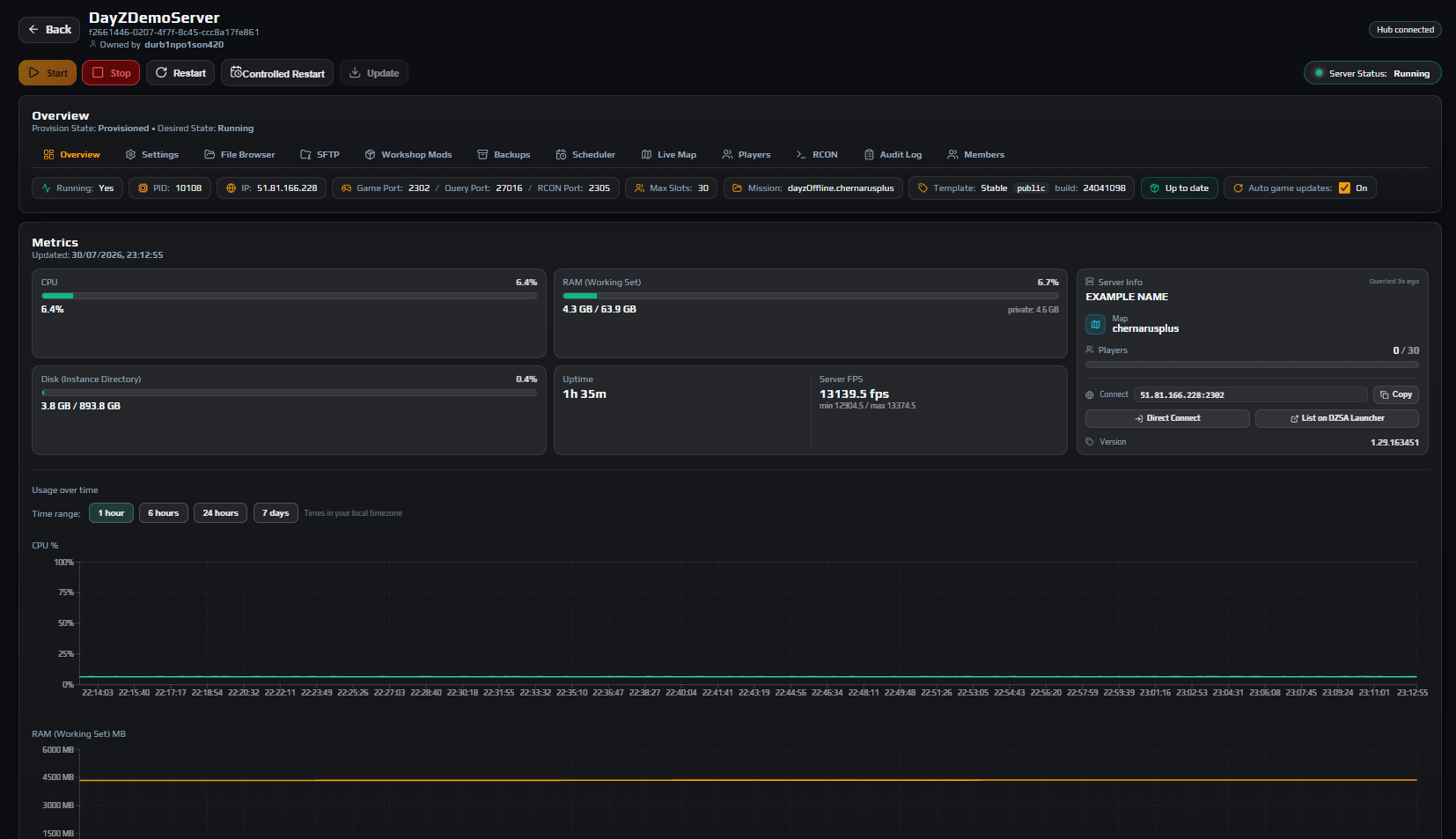
Before changing anything, get your bearings. The Overview tab shows you:
- Server Status —
Running,StoppedorUpdating. A brand new server readsStopped. - The connection block: IP, Game Port, Query Port and RCON Port. Your RCON port is always the game port plus three.
- Max Slots, Mission (the map,
dayzOffline.chernarusplusby default) and Template (the game build). - Connect with a Copy button, plus Direct Connect and List on DZSA Launcher links for sharing.
- Live CPU, RAM and Disk meters, Uptime and Server FPS once it is running.
Note the Auto game updates toggle. Leave it on: when Bohemia ships a new DayZ build, the panel stops your server, updates it and starts it again on its own, which is usually what you want.
3. Name your server and set the basics
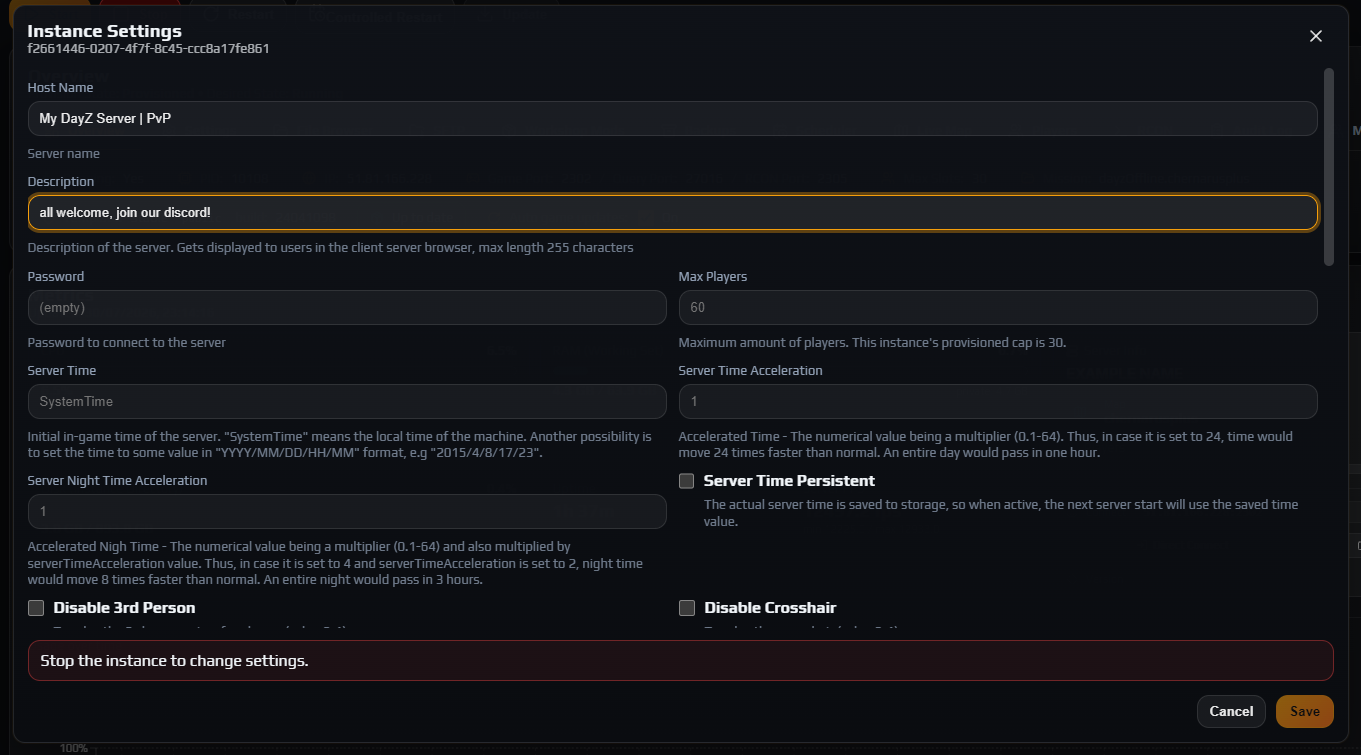
Click Settings in the tab bar to open the Instance Settings panel. This is a proper editor for serverDZ.cfg — every field maps to a real config value, so you never hand-edit the file for routine changes.
Careful: Settings can only be saved while the server is Stopped. On a new server it already is. Later on, stop it first or the panel will tell you to.
At minimum, set:
- Host Name — what players see in the server browser. Make it searchable: the map name and your key features help far more than decoration.
- Description — one line, up to 255 characters.
- Max Players — capped at the slot count you bought.
- Password — leave empty for a public server.
Everything else has a sensible default. When you are ready to tune loot, day length, third-person or the admin logs, work through every serverDZ.cfg setting explained rather than guessing.
Click Save. You should see Changes Saved!.
4. Set your admin and RCON password
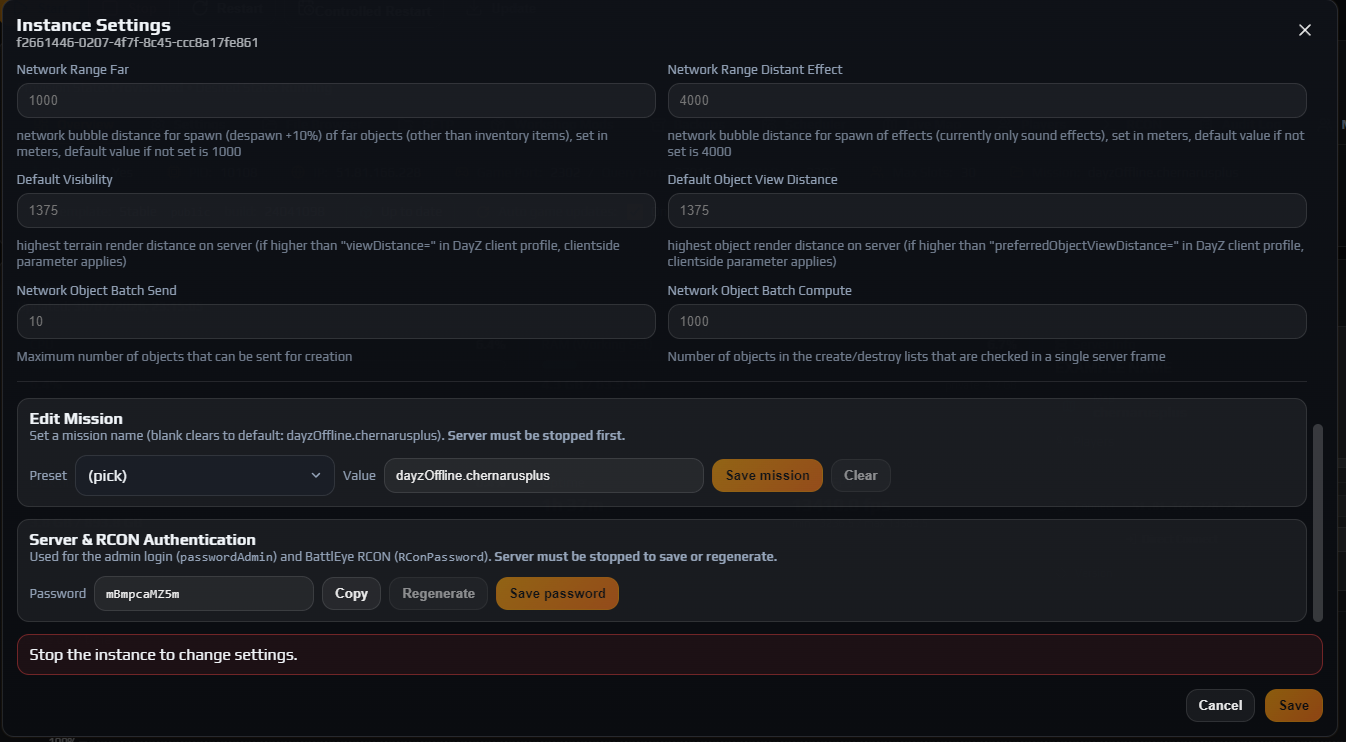
Scroll to Server & RCON Authentication in the same panel. This one password covers two things: the in-game admin login (passwordAdmin) and BattlEye RCON (RConPassword), which is what the panel’s own RCON console and any external admin tool authenticate with.
Click Regenerate for a strong value, or type your own. The engine is strict here:
- 4 to 10 characters, no more
- letters and numbers only —
A-Z,a-z,0-9
Hit Save password, then Copy and store it in your password manager. You will need it for RCON, bans and the whitelist.
Careful: Treat this like a root password. Anyone holding it can run RCON commands against your server, which includes kicking and banning every player on it.
5. Add mods now, if you want any
If you plan to run mods, add them before your first start so the world generates with them in place. Open Workshop Mods, paste a Steam Workshop URL or its numeric id, and click Lookup & add.
The panel resolves the mod’s dependencies for you and installs those first, which is the single most common cause of a modded server failing to boot. Load order, server-only mods and auto-updates all matter and all have real consequences, so work through installing Steam Workshop mods rather than improvising.
Note: Some mods are marked ESSENTIAL with a padlock. Those come from the service template, they are required for your server to work, and they cannot be removed or reordered.
Running vanilla for now? Skip this entirely. You can add mods at any time later.
6. Start the server and connect
Back on Overview, click Start. First boot takes longer than later ones because DayZ generates the persistence storage. Watch the Live Logs card underneath and switch the Stream dropdown to rpt to follow along.
You are up when Server Status shows Running, the Server Info panel fills in with your name and player count, and Server FPS reports a number.
Now test it from the game. Use Copy next to Connect to grab your ip:port, then in DayZ open the server browser, go to Community, paste it into the search box, and join. Your admin password is what logs you in in-game.
Note: Not appearing in the public browser straight away is normal — it can take a few minutes to be listed. Direct Connect works immediately.
7. Set up a nightly restart and backups
Two pieces of housekeeping make the difference between a server that stays healthy and one you end up firefighting.
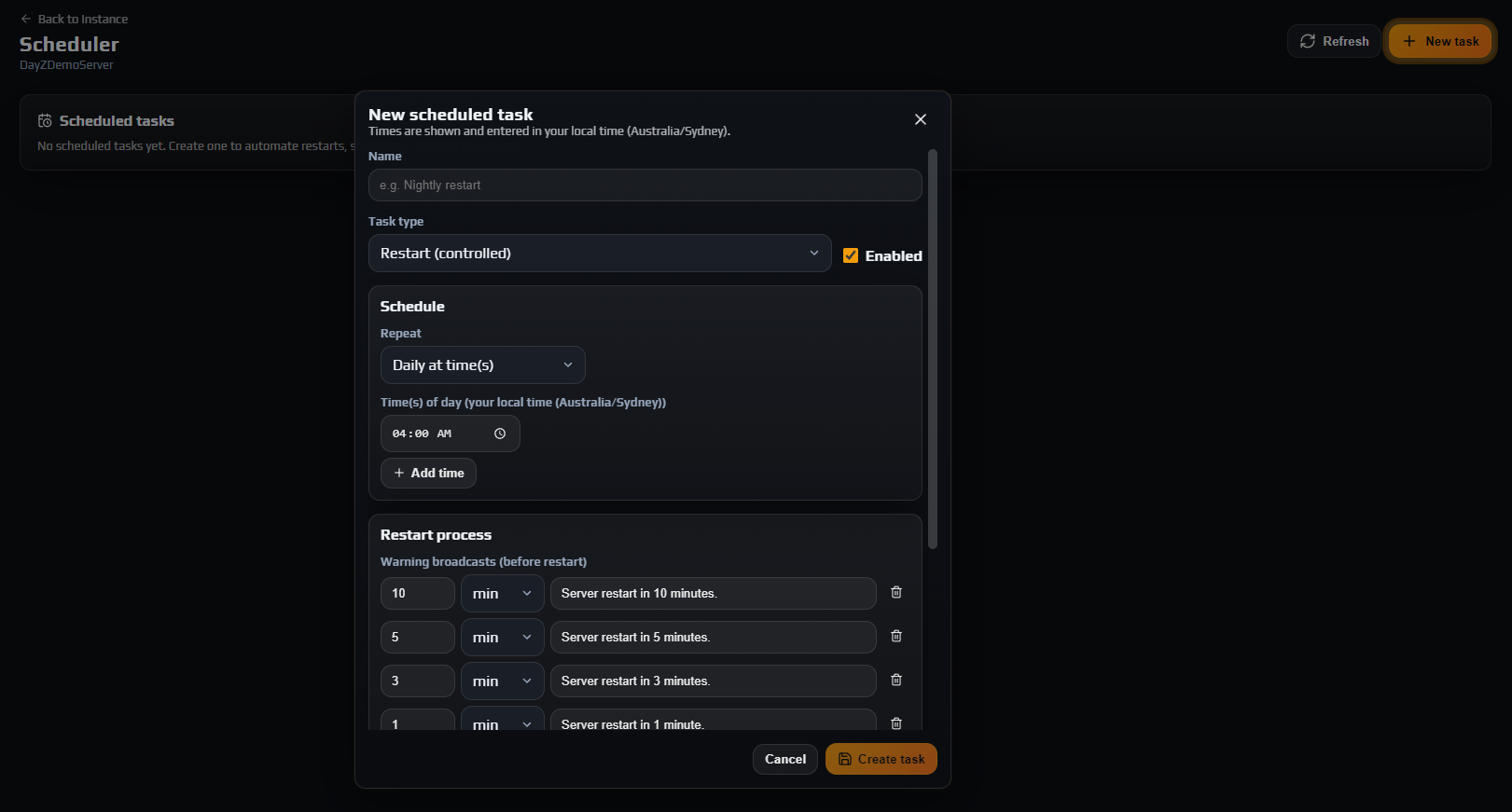
Nightly restarts. DayZ servers degrade over long uptimes. Open Scheduler, click New task, choose Restart (controlled) and set it to repeat daily at a quiet hour. The default warning ladder broadcasts at 10, 5, 3 and 1 minutes and again 30 seconds out, so players get a chance to log out somewhere safe. That is exactly what prevents the rollbacks and lost gear covered in restarting without rollbacks.
Backups. Open Backups and pick a frequency — Daily suits most servers. Backups are kept for 30 days and you can restore Players DB, World Data and mission XMLs independently, which matters when you only want to undo one of them. See automatic backups and restore.
Note: Want your own copy on your own disk as well? SFTP gives you full access to the mission and persistence folders — see connecting with SFTP.
Troubleshooting
My server is not in the Instances list after ordering
Why it happens. Provisioning runs as a background job just after payment, so there is a short gap. Occasionally it cannot complete on its own — if no node in your chosen location has capacity, it stops and raises an alert with our team instead of half-building your server.
How to fix it. Give it a minute and refresh. If it is still missing after about five, open a ticket with your order number. We will see the provisioning alert on our side and can place it manually.
Settings will not save and the panel says to stop the instance
Why it happens. serverDZ.cfg is read by the engine at boot and rewriting it underneath a live process would either be ignored or corrupt it, so the panel refuses while the server is running.
How to fix it. Click Stop on Overview, wait for Stopped, then save. If players are online, use Controlled Restart instead so they are warned first.
The server says Running but nobody can connect
Why it happens. Usually the server is still loading — on a modded first boot that can take several minutes — or a mod failed and the engine is stuck part-way up.
How to fix it. Open Live Logs, set Stream to rpt and read the tail. A clean boot ends with the mission loaded. If you see a mod error, check Workshop Mods for a Failed status or a Missing dependencies card.
I lost my admin password
Why it happens. The password is stored for the server, not for you, and the field is masked.
How to fix it. Stop the server, open Settings → Server & RCON Authentication, click Regenerate then Save password, and copy the new value. Anything using the old RCON password needs updating.
Frequently asked questions
Do I have to install DayZ server files myself?
No. The server is provisioned with the game files, a default mission and a working serverDZ.cfg already in place, and it keeps itself patched when Auto game updates is on. You only manage configuration and mods.
How do I change the map?
Open Settings, scroll to Edit Mission and pick a Preset such as dayzOffline.enoch for Livonia or dayzOffline.sakhal for Sakhal, then Save mission. The server must be stopped. Changing map means a different persistence world, so your existing bases and characters stay behind on the old one.
Can I give someone else access without sharing my password?
Yes, and you should. Members lets you add a sub-user with precisely the permissions you choose — from log-reading only up to full control — and every action is attributed in the Audit Log. See staff permissions and API keys.
Where do I find my server files?
Either the File Browser tab in the panel or an SFTP client. Both expose the same four folders: profiles, mpmissions, config and mods. SFTP is the better choice for anything large — see connecting with SFTP.
Does the panel restart my server when a DayZ update ships?
Yes, when Auto game updates is on. The panel notices the new build, stops the server, updates the game data and starts it again, logging each step in the Audit Log. Mods marked Auto-update are handled the same way.